
Nano Banana vs Midjourney? The 2026 Best Choice
🥇 For 80% of creators, the answer is Nano Banana.
Why? Invisible AI. It turns your idea into a stunning image on the first try. No struggle.
🖌️ Midjourney is for the 20%
the artists & alchemists. It’s a powerhouse, but you have to learn its secret language.
1. The 10-Second Decision Guide:
You’re a blogger, marketer, entrepreneur needing fast, reliable visuals? ➡️ Pick Nano Banana.
You’re a digital artist or hobbyist who loves crafting the perfect prompt as an art form? ➡️ Pick Midjourney.
2. See the CORE Difference in One Prompt
The Test:
"A photorealistic, wide-angle shot of a futuristic workshop. In the center, a sleek vintage robot is delicately holding a small clockwork sparrow. On a wooden workbench in the foreground, there is a handwritten chalkboard sign that clearly says "PRECISION GEARS". Through a large glass window in the background, a lush greenhouse is visible during a purple sunset. Cinematic lighting, 8k resolution, highly detailed textures."
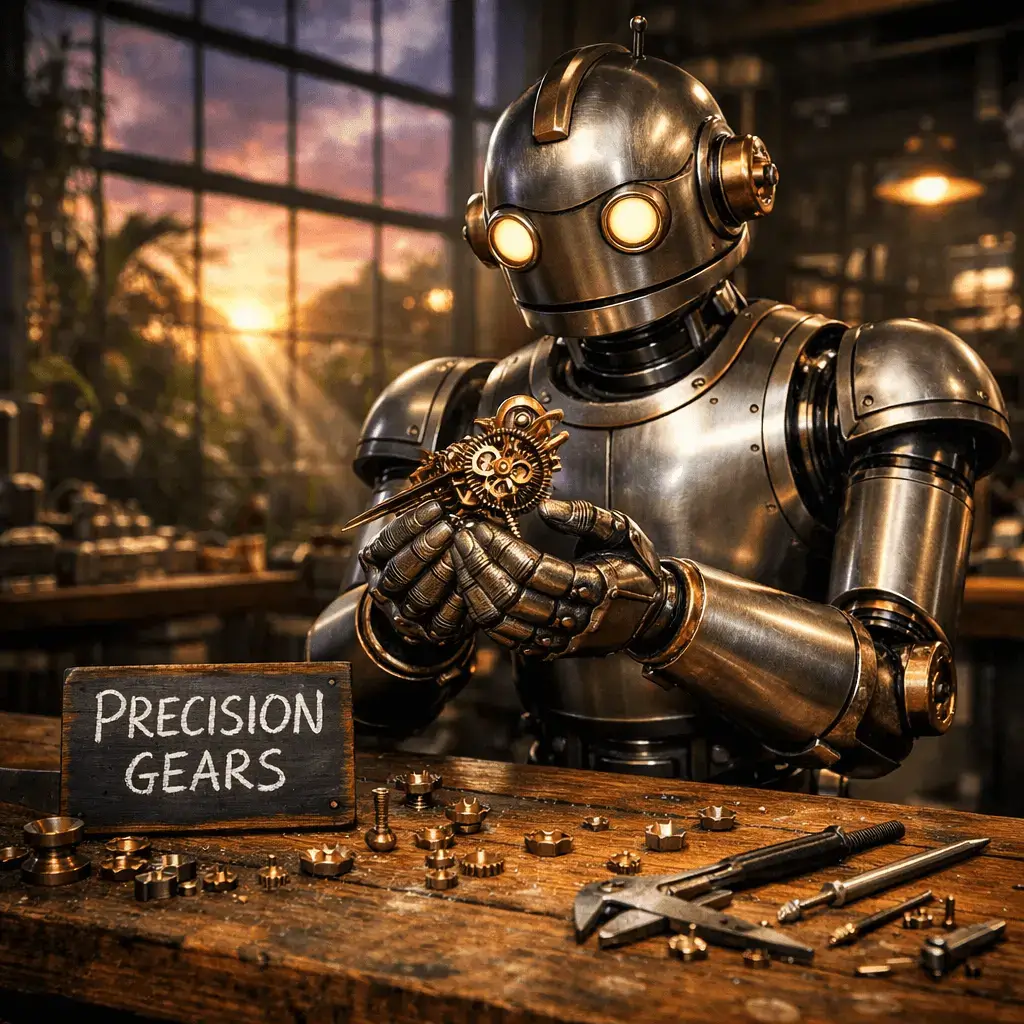
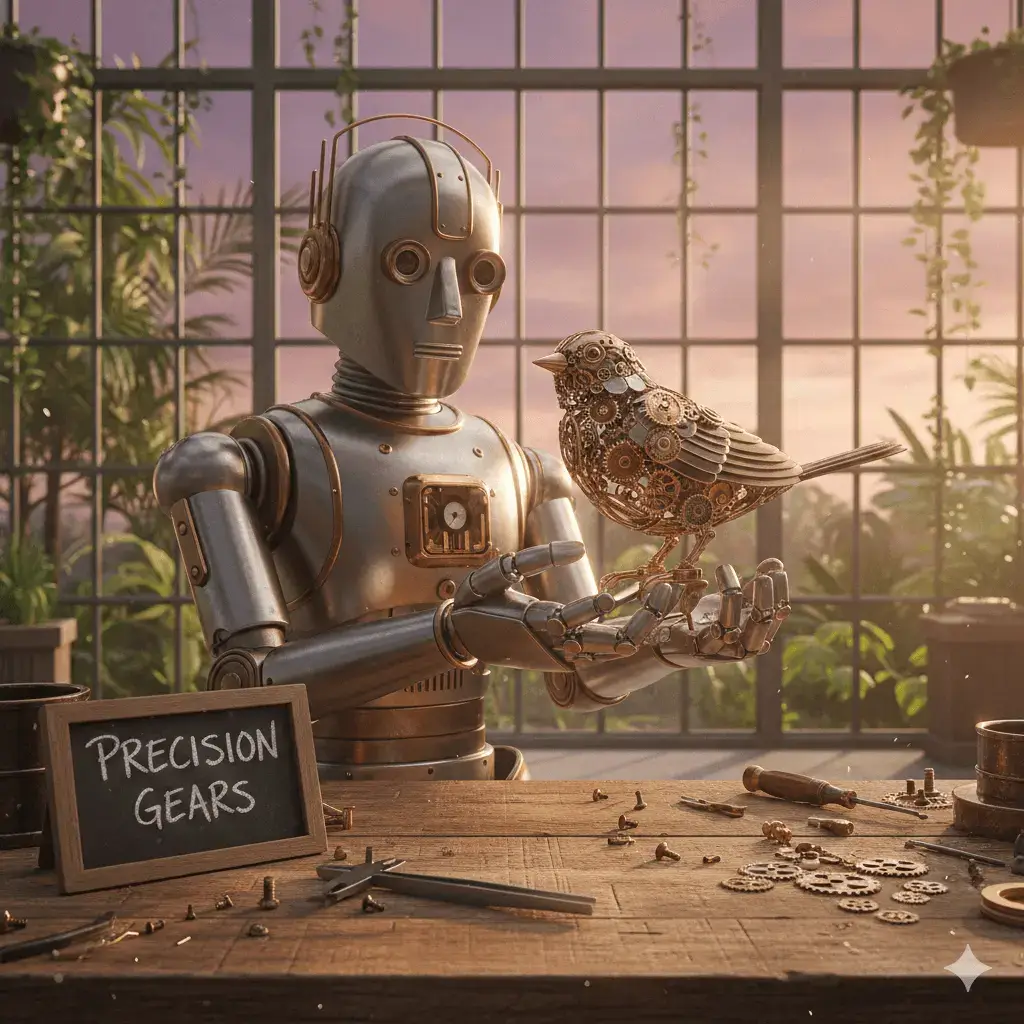
3. Nano Banana’s KILLER Feature: Style Lock
3.1. The Professional’s Secret Weapon
Generate one image you like. Hit “Style Lock.” Generate new images with consistent visual style (colors, lighting, texture).
Why It Matters:
• Brand Consistency: Create campaign visuals that actually look like they belong together.
• Storyboarding: Maintain character and atmosphere across multiple scenes.
• Time Saved: Minutes instead of hours of prompt tweaking.
3.2. Nano Banana vs Midjourney Verdict Table :
If You Value… |
Choose |
The Why |
|---|---|---|
Ease & Speed 🚀 |
Nano Banana |
Works immediately. No technical syntax to learn. |
Artistic Depth 🎨 |
Midjourney |
Unmatched for painterly, surprising, gallery-worthy art. |
Project Consistency ✅ |
Nano Banana |
Style Lock makes multi-image projects actually possible. |
Prompt Crafting as a Sport ⚙️ |
Midjourney |
The Discord community and parameter tuning is the hobby itself. |
3.3. Pricing Face-Off: What You Actually Pay
2026 Pricing Comparison Table
Feature |
Midjourney |
Nano Banana |
|---|---|---|
Free Access |
None (Paid subscription only) |
Available (Free via Gemini app/AI Studio with daily limits) |
Basic Plan |
$10/month |
$19.99/month (Google AI Pro) |
Pro Plan |
**$30 – $60/month** |
$249.99/month (Google AI Ultra) |
4. The Honest Truth: What Works & What Doesn’t
Nano Banana
Pros
- Perfect Text: Actually spells words correctly on signs and labels.
- Conversational: Edit by just talking (e.g. “Change the shoes to blue”)
- Speed/Volume: Massive daily limits ( 1,000 images) and private by default.
Cons
- Safety filters: Strict refusal on public figures or “sensitive” content.
- Style: Can look “too clean” or generic compared to Midjourney’s grit.
- Limited Pro: No advanced parametors like “Chaos” or “Stylize” levels
Midjourney (v7)
Pros
- Artistic Quality: Best lighting, texture and “vibe in the industry.”
- Consistency: Features like –cref keep characters looking the same across images.
- Pro tools: Manual control to Pan, Zoom and “Vary Region”(Impainting)
Cons
- Privacy: Everyone can see your images unless you pay $60/mo.
- Logic: Often struggles with complex text and specific spatial requests.
- Cost: Not free trial, strictly “pay-to-play”.
5. The Bottom Line
For businesses & content creators: Google AI Pro’s (Nano Banana) $19.99/month provides better ROI through massive daily limits, private-by-default generations, and 2TB of bundled cloud storage.
For dedicated artists: Midjourney’s $10–$60/month delivers unmatched creative potential and style consistency (v7) worth the manual learning curve.
- Tight budget? Gemini’s “Free” tier is more generous for basic tasks, but neither tool offers a permanent “unlimited” free trial anymore.
- Solo artist? Midjourney Basic ($10) is the cheapest entry point for high-end art.
- Professional work? Google AI Pro ($19.99) saves hours with conversational editing and perfect text rendering.
- Maximum privacy? Midjourney Pro ($60) is required for “Stealth Mode”; Gemini is private on all paid tiers.
6. What Do You Think? Which Fits Your Budget?
Team Gemini 🙋♂️ (Predictable costs, integrated with Google Workspace, 1,000+ images/day)
Team Midjourney 🎨 (Deep artistic control, v7 personalization, community gallery)
6.1. Need help deciding? Nano Banana vs Midjourney
Check for “Promo Windows.” Google often offers a 1-month free trial for new AI Pro subscribers, while Midjourney occasionally opens 24-hour free access during new version launches.
Note: December 2025 pricing shown. Features reflect current v7 (Midjourney) and Gemini 3 Pro standards.
Thank you